
On-premises live chat, AI Agents, co-browse, and video, running inside your network on Windows Server, IIS, and Microsoft SQL. Keep customer data under your control with no per-seat cloud bill.
Figures are modeled from the assumptions in the calculator below. Replace them with your own contract rates and your ChatBeacon quote.
ChatBeacon started in 2005 as an on-premise installation. Self-hosting is not a variant we bolted on for enterprise buyers. It is the product we began with, and twenty years later we still ship, install and support it.
Cloud is a subscription per agent seat. Private Cloud is a dedicated environment quoted on your configuration. On-Premises is a one-time license you install and own. Every tier includes AI chatbots, live chat, co-browse and video, with no per-resolution fees and no conversation quotas.
We host and operate it on Microsoft Azure. Fastest to launch, lowest to start, billed every month for as long as you use it.
A single-tenant deployment we operate for you. Isolation and data residency without your team running the servers.
Priced on your configuration, region and support terms. Available on Enterprise agreements.
You install it on your Windows Server, IIS and Microsoft SQL. Bought once, maintained annually, yours to keep.
Every tier includes AI chatbots on your own OpenAI key with unlimited resolutions, live chat, CoVision co-browse and screen share, video, session replay and Viewport 360 analytics. Prices shown are list and subject to change; annual and multi-year terms are quoted separately.
Get your quoteChatBeacon AIX On-Premises provides predictable pricing as your organization grows. Compare the cost of recurring per-agent cloud fees with owning and maintaining your deployment, then see when on-premise delivers greater long-term value.
Every transcript, visitor record, co-browse session and AI prompt is written to a database your DBAs administer, on a server your team patches, behind the firewall your security group already audits.
Chat transcripts, visitor identities, uploaded files and session replays are stored in your Microsoft SQL database. There is no vendor-side copy, no shared tenancy, and no third-party subprocessor holding your customers’ conversations.
The platform runs with no outbound internet route at all. For classified, defense and isolated OT environments, install media and updates are delivered as signed packages and applied through your existing offline patch process.
Encryption at rest uses keys your organization generates, escrows and rotates. Key custody stays with your security team, which means access revocation is a decision you make and execute yourself, without filing a vendor ticket.
Operators authenticate against the directory you already run. Group membership drives ability groups and permissions, joiners and leavers flow through your existing identity lifecycle, and there is no separate password store to audit.
A hosted platform adds a vendor to your compliance surface. Every audit then has to cover their controls, their staff and their subprocessors as well as yours. A self-hosted install does not. ChatBeacon AIX runs inside the environment you have already accredited, so the evidence your auditors need is evidence you already produce.
A rack in your own data center is one option. So is a virtual machine in your existing cloud tenancy. On-premise here means the software, the database and the data belong to you and run in an environment you control, wherever that environment happens to live.
A standard Microsoft stack your infrastructure team already supports, whether the host is a rack in your building or a VM in your cloud account. The Operator App is web-based, so agents need nothing installed on their machines.
These are the current interfaces. On-premise customers get the same three surfaces, running on their own servers.
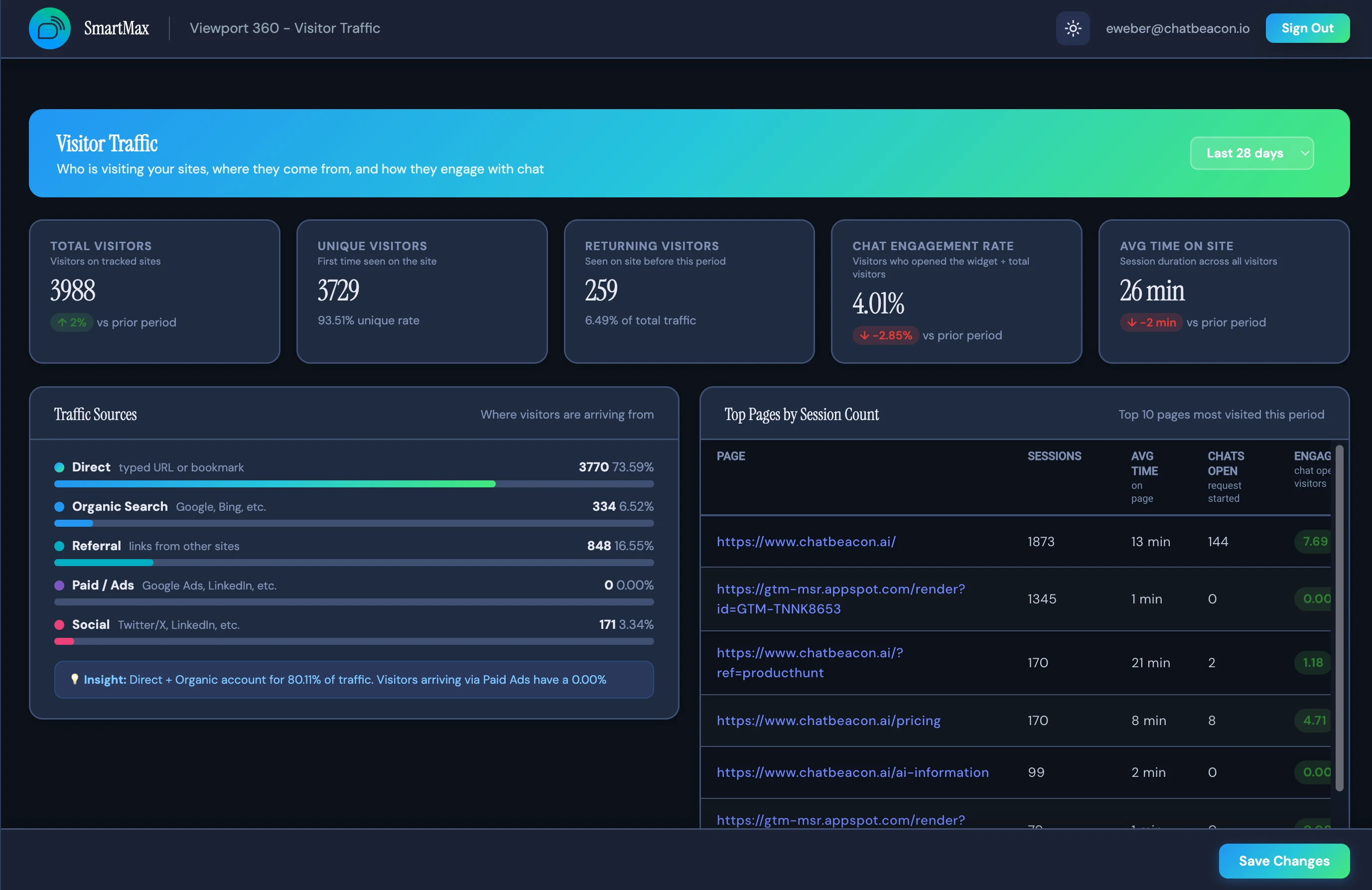
Visitor traffic, chat volume, quality and satisfaction, agent performance. Every metric is computed from your own SQL data, so reporting continues to work with no outbound telemetry.
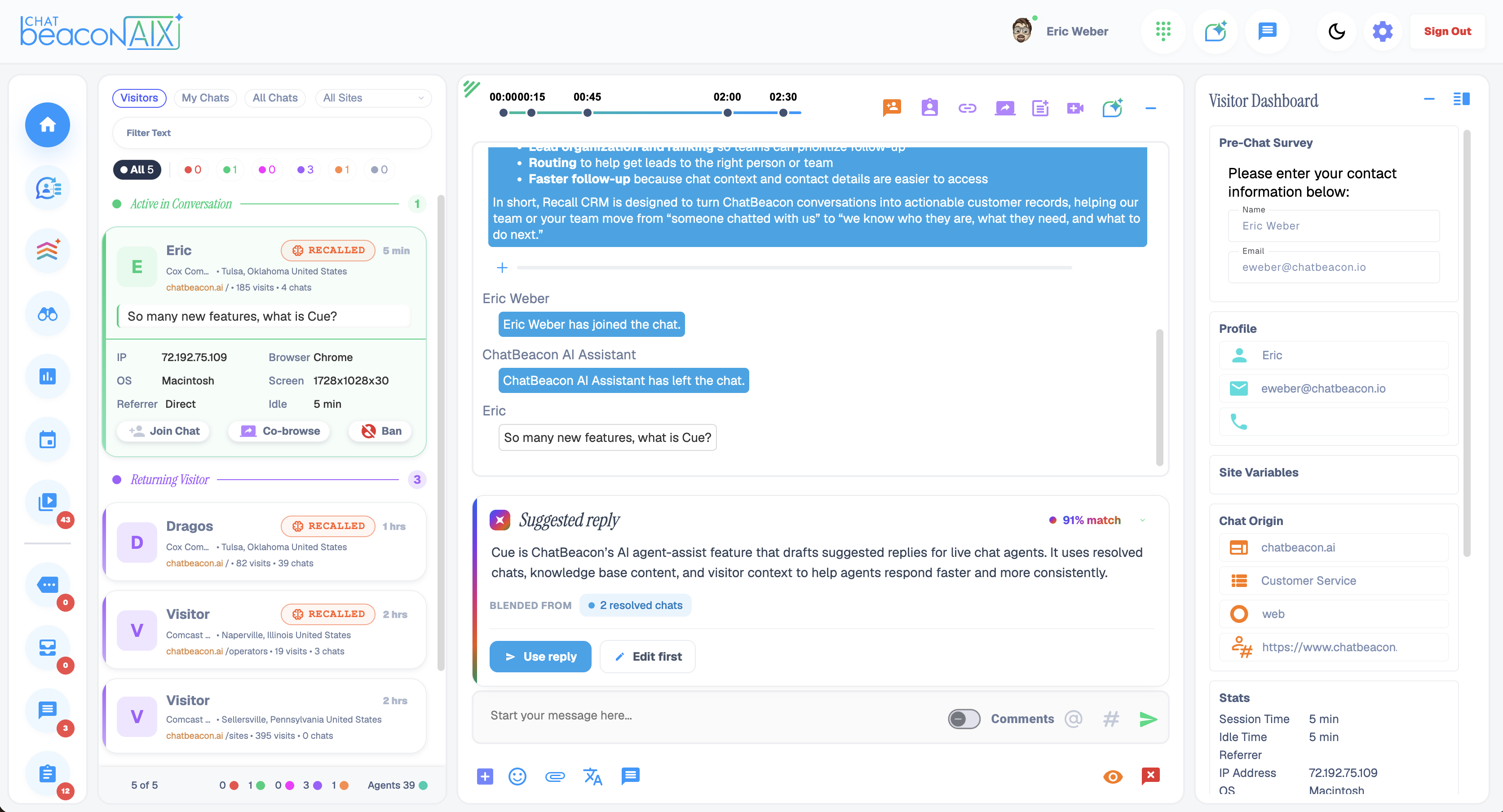
Queued visitors, session replay, event timeline and the AI assistant pane in one browser tab. Nothing to install on operator workstations and nothing to package for your desktop image.
The visitor-facing widget answers tier-one questions and escalates to a live agent when it should. Served from your own domain, styled to your brand in the Admin Portal’s theme studio.
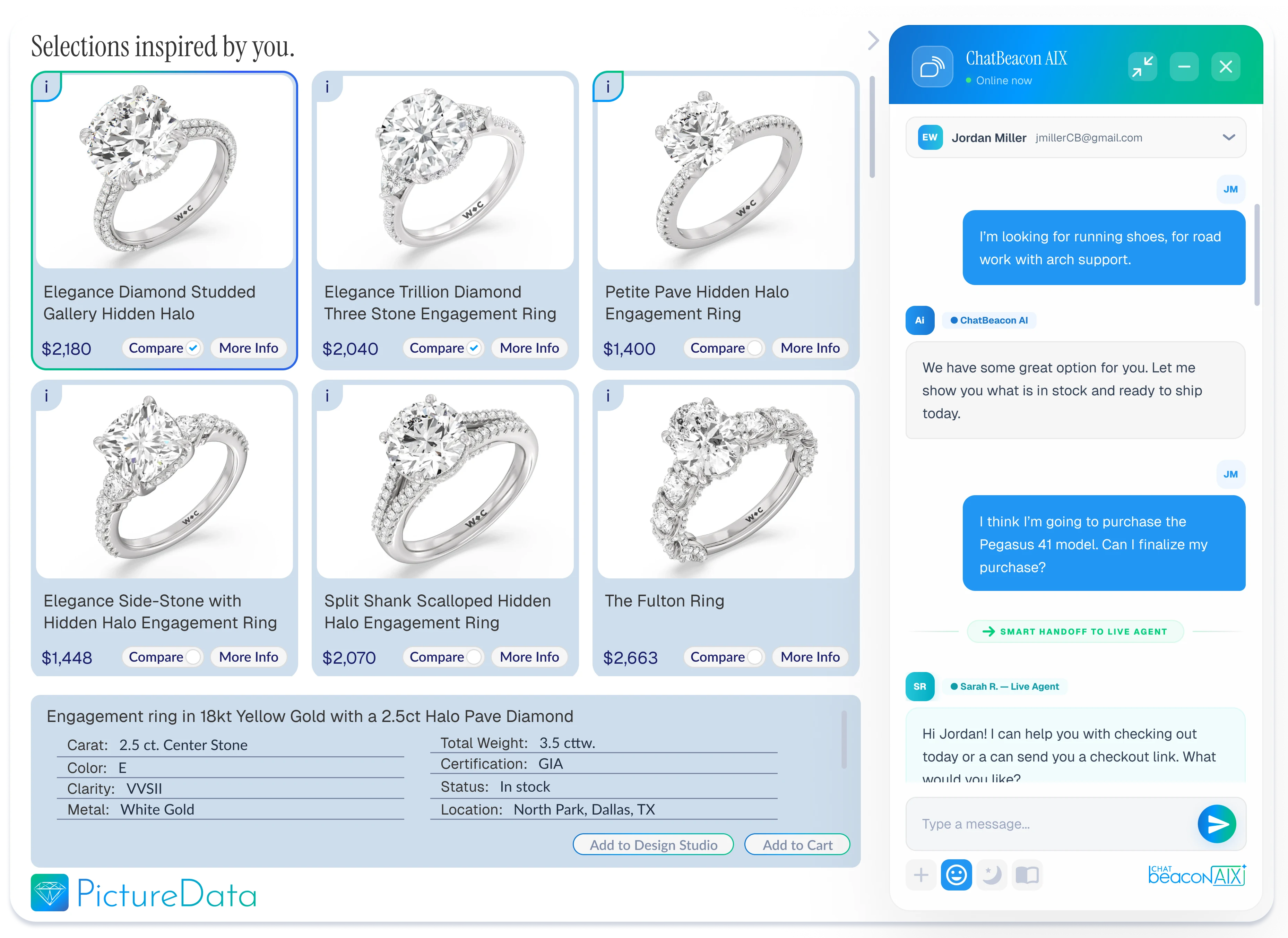
Most self-hosted chat platforms stop at text. ChatBeacon has shipped co-browse since long before it was fashionable, and the on-premise build includes it. When a customer cannot find the field, the agent sees the page with them rather than describing it over three messages.
Agents see the visitor’s page in real time at the DOM level and can guide them through a form or a checkout. No download, no screen-share invitation, no third-party relay service in the path.
A chat can become a video call in one click when identity verification or a complex problem needs a face. The media path stays inside the deployment you control.
Every session is reconstructable with a timeline of visitor and agent events, for quality review, dispute resolution and training. Replays live in your database like everything else.
We size the Windows Server and SQL instance against your traffic, confirm the TLS and DNS plan, and agree the firewall rules.
IIS site and services deployed, database schema created, directory binding configured and tested with a pilot operator group.
Business rules, ability groups, widget theming and the AI knowledge base, followed by operator and administrator training.
Widget script switched to your domain, cloud history migrated if you are moving, and the subscription cancelled.
Yes. ChatBeacon AIX can be deployed within your organization’s own infrastructure, giving you direct control over the platform, database, customer conversations, security policies, system access, maintenance schedule, and deployment environment.
ChatBeacon AIX is available through fully managed cloud, dedicated cloud, and true on-premise deployment. Your organization can select the deployment model that best aligns with its security, compliance, infrastructure, data-residency, and operational requirements.
Organizations commonly choose on-premise live chat software when they require greater control over customer data, infrastructure, security, system access, maintenance, and regulatory procedures. On-premise deployment is particularly valuable for banks, government agencies, educational institutions, healthcare organizations, insurance companies, and other security-conscious enterprises.
ChatBeacon AIX operates within your organization’s controlled environment using your own Microsoft SQL Server database. Customer conversations, transcripts, and related platform data remain under your organization’s control and are governed by your internal security, retention, and data-management policies.
Yes. ChatBeacon works with your technical and operational teams to establish an implementation plan based on your infrastructure, security requirements, desired configuration, and deployment objectives. The process covers planning, installation, configuration, testing, training, and preparation for launch.
Yes. ChatBeacon provides hands-on installation and configuration assistance for on-premise deployments. Our team works directly with your designated technical personnel to help configure the platform correctly, address implementation requirements, and prepare the environment for production use.
Technical requirements are determined according to the size, expected usage, security policies, and configuration of each deployment. During implementation planning, ChatBeacon works with your IT team to identify the required infrastructure, Microsoft SQL Server environment, network access, permissions, and other technical prerequisites.
Yes. ChatBeacon provides training for administrators, supervisors, and agents. Training can cover platform administration, live chat workflows, AI capabilities, agent tools, routing, reporting, co-browsing, screen sharing, and other capabilities included in your selected solution.
ChatBeacon provides ongoing technical assistance, troubleshooting, upgrade guidance, and platform support after implementation. Our team continues working with your organization’s technical and operational personnel to help maintain a stable and effective ChatBeacon environment.
Your organization retains control over its infrastructure, maintenance windows, and upgrade schedule. ChatBeacon provides upgrade guidance and technical assistance while coordinating with your IT team and respecting your internal security, testing, and change-management procedures.
ChatBeacon AIX brings AI agents and human live chat together within one customer engagement platform. AI can answer questions, assist visitors, and automate routine interactions, while conversations can transition to members of your organization’s team when live human assistance is required. Available AI capabilities are determined by the selected deployment configuration.
Yes. ChatBeacon can support integrations with business applications, customer databases, identity-management platforms, and other internal systems based on your organization’s technical requirements. Our team can help determine the appropriate integration approach for your environment.
Yes. ChatBeacon can support multiple websites, departments, teams, and customer-engagement workflows within one platform. Organizations can configure routing, permissions, branding, departments, and operational rules around their structure and service requirements.
Yes. ChatBeacon provides co-browsing and screen-sharing capabilities that allow agents to assist customers visually in real time. Agents can guide visitors through websites, applications, forms, and complex processes, helping improve resolution times and the customer experience.
Yes. ChatBeacon provides reporting and analytics that help organizations understand conversation volume, customer needs, agent activity, response performance, and engagement trends. Because the platform is deployed within your environment, your organization retains control over the associated conversation and reporting data.
ChatBeacon AIX uses platform-based pricing tailored to the organization’s deployment model, users, features, implementation requirements, and technical environment. ChatBeacon does not charge for every customer conversation or AI engagement, helping organizations avoid unpredictable usage-based interaction fees as customer demand grows.
Yes. Existing ChatBeacon customers can work with our team to evaluate their current environment and determine the appropriate upgrade path to ChatBeacon AIX. The upgrade plan is based on the customer’s installed version, infrastructure, selected capabilities, deployment requirements, and desired implementation schedule.
Tell us how many agents you run and what your current platform costs. We will send license pricing, a sizing specification for your Windows and SQL environment, and a three-year comparison against your existing contract.